
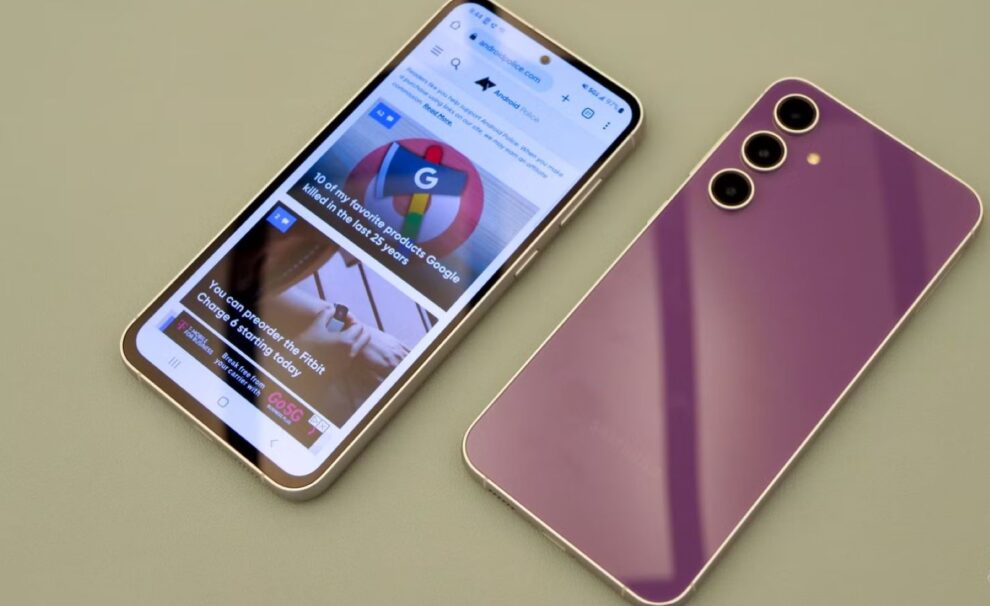
Samsung has started rolling out its One UI 8 software update, based on Android 16, for the Samsung Galaxy S23 FE in the United States. This significant update, which was initially released internationally a couple of weeks ago, brings the latest features and platform improvements to the Fan Edition model for US users, marking it as the third major Android operating system update for the device since its launch. The update is currently available for carrier-locked versions on select US networks, carrying the firmware version S711USQU6EYIF, and comes in as a large download package of nearly 3GB, suggesting users should download it over a stable Wi-Fi connection. The rollout for unlocked models across the country is expected to follow soon.
Key Takeaways
- Software Version: Samsung Galaxy S23 FE is receiving the One UI 8 update, based on Android 16, in the US.
- Availability: The update began rolling out for carrier-locked units on certain US networks.
- Firmware Details: The update features firmware version S711USQU6EYIF and is a large download, nearly 3GB in size.
- New Features: One UI 8 includes numerous improvements like an updated Quick Share, a redesigned Samsung Internet browser, and expanded AI-assisted tools.
- Update Status: This is the third major Android OS update for the Galaxy S23 FE, meaning it is expected to receive one more major Android OS update in the future.
The Galaxy S23 FE (Fan Edition) is a mid-premium smartphone in the Samsung Galaxy ecosystem, offering flagship-level features at a more accessible price point. It launched in 2023 running on Android 13 (One UI 5.0). Key specifications of the device include a 6.4-inch Dynamic AMOLED 2X Display with a 120Hz adaptive refresh rate, a 50MP triple-rear camera setup, a 10MP front camera, an Exynos 2200 processor (in many regions, including some US variants), and a 4,500mAh battery with 25W fast wired charging support.
The arrival of One UI 8 on the S23 FE brings with it substantial changes, many of which focus on refining the user experience and introducing advanced capabilities, including certain AI-powered functionalities. While One UI 8 is not a massive visual overhaul compared to its predecessor, One UI 7, it introduces practical changes across various system applications and interface elements.
One key aspect of the new update is the strengthening of the platform’s focus on personal and productivity tools. For instance, the Quick Share feature now presents a full-screen layout with separate tabs for sending and receiving content, making file sharing simpler. The Samsung Internet application receives a refreshed menu layout and more options for customization. Furthermore, productivity apps like Calendar, Clock, and Reminders now offer expanded tools for managing alarms, events, and personal notes. The system also brings improvements to security, specifically for the Secure Folder, with better encryption and app isolation for sensitive data.
Users who own a carrier-locked Galaxy S23 FE device in the US should check for the update manually if they have not received a notification yet. The update process is straightforward: navigate to Settings, scroll to Software update, and then select Download and install.
For users in India, while the One UI 8 update for other Galaxy flagships and mid-range devices is already underway, the arrival of the update on the S23 FE in the US indicates a wider, systematic global rollout is in progress. Indian users can also expect the new software to reach their devices in the coming weeks or months as part of Samsung’s update schedule. The move confirms Samsung’s commitment to providing long-term software support for its Fan Edition series.
Related FAQs
Q1. What is One UI 8 and what Android version is it based on?
A: One UI 8 is the latest version of Samsung’s custom user interface overlay for its Galaxy devices. It is based on Android 16.
Q2. Does the One UI 8 update for Galaxy S23 FE include Galaxy AI features?
A: One UI 8 primarily brings general platform and app improvements. However, a previous update, One UI 6.1, already brought many core Galaxy AI features like Circle to Search with Google, Live Translate, and Generative Edit to the Galaxy S23 FE. The One UI 8 update is expected to integrate these and newer AI-assisted features more deeply.
Q3. How can I manually check for the One UI 8 update on my Galaxy S23 FE?
A: You can check for the update by opening the Settings app on your phone, selecting Software update, and then tapping on Download and install. Ensure your phone is connected to Wi-Fi and has sufficient battery charge before starting the download.
Q4. Which countries received the One UI 8 update for the Galaxy S23 FE before the US?
A: The One UI 8 update for the Samsung Galaxy S23 FE first started rolling out in countries in regions like South Korea and Europe approximately two weeks before its arrival in the US.






Add Comment