
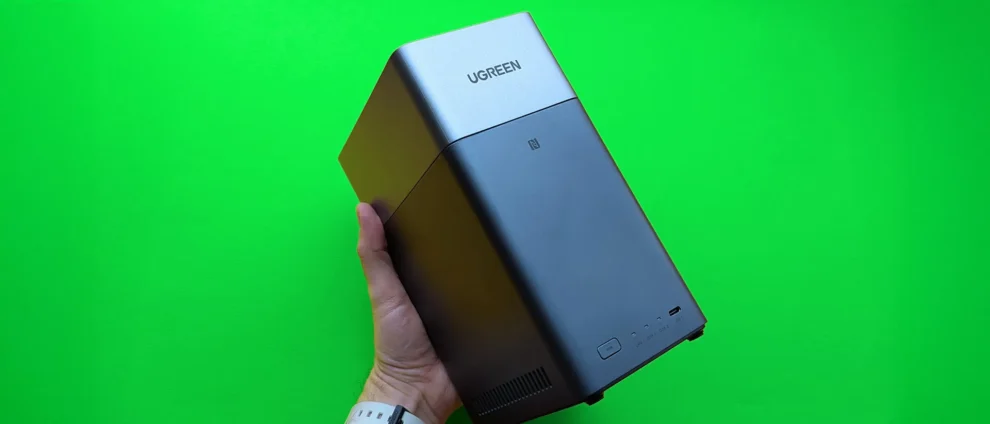
Setting up a Network Attached Storage device often sounds like something best left to IT professionals or serious hobbyists, but the UGREEN DXP2800 quietly challenges that idea. This entry-level NAS is clearly aimed at home users who want a more practical way to manage their files without relying on monthly cloud subscriptions. Instead of juggling external drives or paying ongoing fees, the device lets you centralize everything in one small box that connects directly to your home router.
Key Takeaways
- The UGREEN DXP2800 features an Intel N100 processor and 8GB of DDR5 RAM.
- Users can repurpose existing SATA hard drives to save money on initial setup.
- The UGOS Pro operating system simplifies file management through a browser or mobile app.
- Local storage provides faster file access speeds compared to standard internet cloud services.
- Setting up a NAS acts as a gateway to hosting private media servers like Plex or Jellyfin.
The DXP2800 sits at the entry point of the UGREEN NASync lineup. It includes two drive bays and supports up to 44TB of total storage if you use the largest drives currently available. There is also an NVMe slot for SSD caching, which can noticeably improve file transfer speeds, especially when dealing with lots of small files. For anyone unfamiliar with NAS hardware, it is essentially a compact computer designed to run all day, quietly serving files to phones, tablets, laptops, and TVs on the same network.
UGREEN’s proprietary operating system, UGOS Pro, plays a big role in keeping the experience accessible. During testing, the setup process was guided step by step, including RAID configuration. RAID mirrors data across two drives so that if one fails, your files are still intact on the other. This redundancy is often the moment people realize why a NAS feels more dependable than a single external USB drive, even if the concept sounds intimidating at first.
Once everything is up and running, many users naturally start experimenting beyond basic file storage. Media streaming is usually the next step. The DXP2800 includes a 4K HDMI output, so it can connect directly to a TV, though most people seem to prefer streaming content over the network. Installing media apps on the NAS lets you build a personal movie and TV library that looks and behaves a bit like a private streaming service. It is an easy shift from simple storage to something that feels more like a home media hub.
Networking is another area where the DXP2800 feels slightly ahead of typical entry-level gear. It supports 2.5GbE, which is faster than the standard 1GbE ports found on older routers. You will need compatible networking equipment to fully benefit, but even without it, the system still performs well for everyday use. Considering it is often priced under $300 during sales, the DXP2800 offers a realistic path for people who want to move away from services like Google One or iCloud, while keeping full control over their data at home.
Frequently Asked Questions
Q. What hard drives work with the UGREEN NAS?
A. The device supports standard 3.5-inch and 2.5-inch SATA hard drives. It also has slots for M.2 NVMe SSDs to help with system speed.
Q. Can I access my files when I am away from home?
A. Yes. UGREEN provides a remote access feature that allows you to log into your NAS via a secure link or mobile app from any location with internet.
Q. Do I need to buy new drives for this model?
A. You do not need new drives if you have healthy used SATA drives. However, mixing drives of different sizes may limit your total usable storage depending on the RAID settings.
Q. Is the UGREEN DXP2800 loud?
A. The device uses a smart fan to stay cool. While you can hear a slight hum, it is generally quiet enough to sit on a desk or in a living room cabinet.







Add Comment